面试官问:能否模拟实现 JS 的 bind 方法
Category(分类): JavaScript Status: 未知
配图来自原文页面,已下载并转换为本地 WebP;原始授权未核实,发布前请人工确认。
前言
你好,我是若川。这是“面试官问”系列的第二篇,旨在帮助读者提升 JavaScript 基础知识,涉及 new、call、apply、this、原型链和函数对象。
用过 React class component 的同学可能写过下面的代码:
import React, { Component } from 'react'

class TodoItem extends Component {
  constructor(props) {
    super(props)
    this.handleClick = this.handleClick.bind(this)
  }

  handleClick() {
    console.log('handleClick')
  }

  render() {
    return <div onClick={this.handleClick}>点击</div>
  }
}

export default TodoItem
class field 箭头函数、函数组件和事件处理器闭包也能解决一部分 this 绑定问题,但理解 bind 仍然有助于掌握函数调用和构造调用。
bind 是什么
Function.prototype.bind 会创建一个新的绑定函数(bound function),把目标函数和预设的 this、前置参数保存起来。调用绑定函数时,绑定参数会排在新调用传入的参数前面。
const obj = {}

console.log(typeof Function.prototype.bind) // function
console.log(typeof Function.prototype.bind()) // function
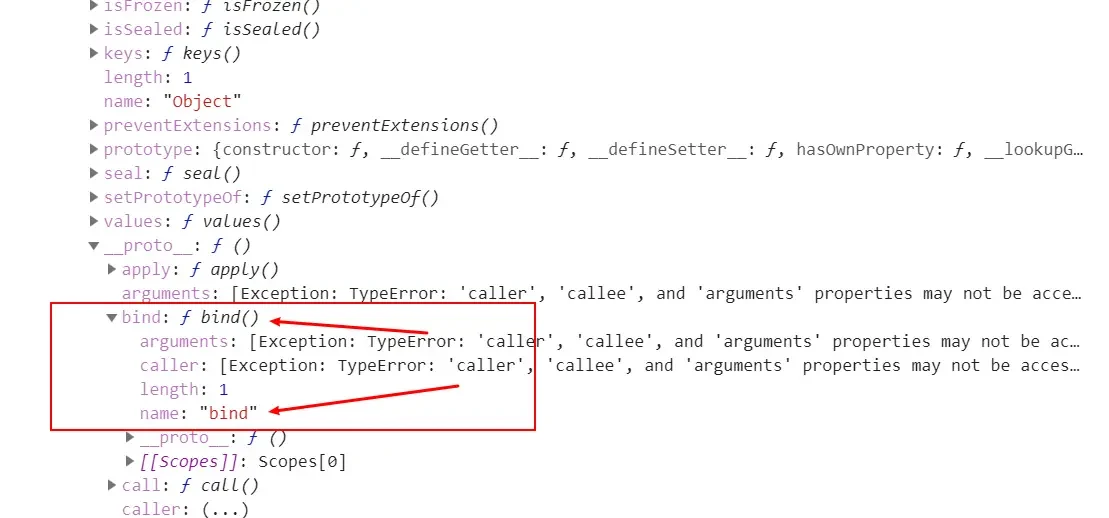
console.log(Function.prototype.bind.name) // bind
console.log(Function.prototype.bind().name) // 'bound '(名称末尾有一个空格)
console.log(Function.prototype.bind.length) // 1
最后一个名称是 'bound ',后面有一个空格:目标函数 Function.prototype 本身没有名字,所以原生绑定函数的名称是 bound 。
绑定 this 和参数
const obj = {
  name: '若川'
}

function original(a, b) {
  console.log(this.name)
  console.log([a, b])
  return false
}

const bound = original.bind(obj, 1)
const boundResult = bound(2)

console.log(boundResult) // false
console.log(original.bind.name) // bind
console.log(original.bind.length) // 1
console.log(original.bind().length) // 2
console.log(bound.name) // bound original
console.log((function () {}).bind().name) // 'bound '(名称末尾有一个空格)
console.log(bound.length) // 1,2 个形参减去 1 个预置参数
可以得到几个结论:
bind是Function.prototype上的方法,每个函数通常都可以调用它。bind(thisArg, ...args)返回一个新函数,不会立即执行目标函数。- 绑定参数和调用绑定函数时传入的参数会按顺序合并。
- 绑定函数的
name通常是目标函数名称前加bound;匿名函数的名称通常是bound。 - 绑定函数的
length通常是max(0, target.length - boundArgs.length),thisArg不计入参数数量。 - 绑定函数执行时会返回目标函数的返回值。
name 和 length 是原生绑定函数的可观察属性,但实现自定义版本时还会遇到属性描述符、原型和内部槽等差异。
第一版:只绑定 this 并合并参数
下面是一个适合入门的简版。它只处理普通函数调用,不处理 new:
function bindSimple(thisArg, ...boundArgs) {
  const target = this

  if (typeof target !== 'function') {
    throw new TypeError('bindSimple must be called on a function')
  }

  return function bound(...callArgs) {
    return Reflect.apply(target, thisArg, [...boundArgs, ...callArgs])
  }
}

const obj = { name: '若川' }

function original(a, b) {
  console.log(this.name)
  console.log([a, b])
}

const bound = bindSimple.call(original, obj, 1)
bound(2) // 若川;[1, 2]
原文使用 [].slice.call(arguments) 和 self.apply,在 ES5 时代是常见写法。现代代码可以使用剩余参数和 Reflect.apply,但二者表达的核心仍然是:保存目标函数、保存前置参数,再以指定的 this 调用目标函数。
这个版本有明显限制:
new bound()的行为没有实现;name和length不符合原生 bind;- 绑定函数自身的原型、
instanceof和错误栈也不能完全模拟; - 不应在生产环境无条件给
Function.prototype添加bindFn,因为会污染全局原型。
如果为了面试演示确实需要添加方法,至少使用不可枚举属性,并在测试结束后清理;生产代码直接使用原生 bind。
bind 返回的函数可以被 new 调用
如果目标函数可构造,原生绑定函数也可以使用 new:
const obj = {
  name: '若川'
}

function Original(a, b) {
  console.log('this 是新对象:', this instanceof Original)
  this.name = b
  this.args = [a, b]
}

const bound = Original.bind(obj, 1)
const value = new bound(2)

console.log(value.name) // 2
console.log(value.args) // [1, 2]
console.log(value instanceof Original) // true
console.log(value instanceof bound) // true
构造调用时,绑定的 thisArg 会被忽略,因为 new 会准备一个新的 this;绑定的前置参数仍然有效。原生绑定函数会把构造行为转发给目标函数,并正确处理目标函数返回的对象。
function ReturnObject(value) {
  this.value = 'ignored'
  return { value }
}

const BoundReturnObject = ReturnObject.bind(null, 'returned')
const result = new BoundReturnObject()
console.log(result.value) // returned
如果目标函数不是可构造的,例如箭头函数,原生绑定函数也不能被 new 调用:
const arrow = () => {}
const boundArrow = arrow.bind(null)

try {
  new boundArrow()
} catch (error) {
  console.log(error instanceof TypeError) // true
}
第二版:使用 Reflect.construct 支持 new
下面的实现使用标准 API 处理构造调用,适合作为现代教学版本:
function bindPolyfill(thisArg, ...boundArgs) {
  const target = this

  if (typeof target !== 'function') {
    throw new TypeError('bindPolyfill must be called on a function')
  }

  function bound(...callArgs) {
    const finalArgs = [...boundArgs, ...callArgs]

    if (new.target !== undefined) {
      // 直接 new bound() 时,让目标函数看到 target 作为 new.target。
      const newTarget = new.target === bound ? target : new.target
      return Reflect.construct(target, finalArgs, newTarget)
    }

    return Reflect.apply(target, thisArg, finalArgs)
  }

  const length = Math.max(0, target.length - boundArgs.length)
  Object.defineProperty(bound, 'length', {
    value: length,
    configurable: true
  })
  Object.defineProperty(bound, 'name', {
    value: `bound ${target.name}`,
    configurable: true
  })

  return bound
}

function Point(x, y) {
  this.x = x
  this.y = y
}

Point.prototype.toString = function () {
  return `${this.x},${this.y}`
}

const obj = {}
const BoundPoint = bindPolyfill.call(Point, obj, 0)
const point = new BoundPoint(5)

console.log(point.toString()) // 0,5
console.log(point instanceof Point) // true
console.log(point.x) // 0
console.log(point.y) // 5
这个实现比 this instanceof bound 更接近现代语义,但仍不是原生 bind 的完全复制:
- 原生 bound function 是规范定义的特殊函数对象,通常没有自己的
prototype自有属性;上面的普通函数bound会带有默认prototype。 - 原生绑定函数的
instanceof、new.target、静态属性继承和跨 realm 行为由引擎内部方法决定。 Reflect.construct能处理可构造函数,但不能把不可构造的箭头函数变成构造函数。Function.prototype.bind还涉及this的严格/非严格模式转换、错误信息和属性描述符细节。
因此,面试中应主动说明“这是教学实现,不声称与原生 bind 完全等价”。
instanceof 检查的局限
历史上的 ES5 模拟实现常使用 this instanceof bound 判断绑定函数是否通过 new 调用。这个方案在没有 new.target 的旧环境中有价值,但它可能被调用者通过原型关系影响;并且绑定函数的目标函数不一定是普通构造器。
function Student(name) {
  if (this instanceof Student) {
    this.name = name
    return
  }

  throw new Error('必须通过 new 关键字来调用 Student')
}

const student = new Student('若')
// student 已经是 Student 实例,因此普通调用也能通过 instanceof 检查。
const result = Student.call(student, '川')
console.log(result) // undefined
console.log(student.name) // 川
ES2015 提供了 new.target:
function Student2(name) {
  if (new.target !== undefined) {
    this.name = name
    return
  }

  throw new Error('必须通过 new 关键字来调用 Student2')
}

const student2 = new Student2('若')
console.log(student2.name) // 若

try {
  Student2.call(student2, '川')
} catch (error) {
  console.log(error.message) // 必须通过 new 关键字来调用 Student2
}
new.target 更适合区分普通调用与构造调用,但 Reflect.construct 可以显式指定 newTarget,所以在框架或元编程代码中仍需按实际 API 契约设计。
第三版:ES5 风格的构造转发
在没有 new.target 和 Reflect.construct 的旧环境中,可以使用一个空构造函数把目标函数的原型接到绑定函数上,再通过 this instanceof bound 判断构造调用:
function bindLegacy(thisArg) {
  const target = this

  if (typeof target !== 'function') {
    throw new TypeError('Function.prototype.bind called on incompatible value')
  }

  const boundArgs = Array.prototype.slice.call(arguments, 1)
  const bound = function () {
    const callArgs = Array.prototype.slice.call(arguments)
    const finalArgs = boundArgs.concat(callArgs)

    if (this instanceof bound) {
      const result = target.apply(this, finalArgs)
      const isObject = result !== null &&
        (typeof result === 'object' || typeof result === 'function')
      return isObject ? result : this
    }

    return target.apply(thisArg, finalArgs)
  }

  if (target.prototype) {
    function Empty() {}
    Empty.prototype = target.prototype
    bound.prototype = new Empty()
  }

  Object.defineProperties(bound, {
    length: {
      value: Math.max(0, target.length - boundArgs.length),
      configurable: true
    },
    name: {
      value: `bound ${target.name}`,
      configurable: true
    }
  })

  return bound
}

function Person(name) {
  this.name = name
}

const BoundPerson = bindLegacy.call(Person, null, 'Ada')
const person = new BoundPerson()
console.log(person.name) // Ada
console.log(person instanceof Person) // true
这里的 Empty 技巧是旧版 polyfill 中常见的原型转接方式。es5-shim 的实现还会处理可调用性检查、绑定参数数量和更多兼容性细节;阅读源码很适合了解 ES5 时代的兼容策略,但不应把它当成现代引擎内部实现。
过去为了让返回函数的 length 看起来像原生 bind,有些 polyfill 会用 Function 构造器动态生成 $0, $1 等形参。现代环境可以直接使用 Object.defineProperty 设置 length,而动态 Function 还可能受到 CSP 限制,因此没有必要在新代码中使用。
多次绑定
一个绑定函数还可以再次调用 bind。后一次绑定会继续追加参数,但不能覆盖第一次绑定的 this:
function list(...args) {
  return [this.label, ...args]
}

const first = list.bind({ label: 'first' }, 1)
const second = first.bind({ label: 'second' }, 2)

console.log(second(3)) // ['first', 1, 2, 3]
bind 与箭头函数
箭头函数没有自己的动态 this,它会捕获定义位置的词法 this,因此对箭头函数调用 bind 只能固定前置参数,不能改变其 this:
const arrow = () => this
const object = {}

console.log(arrow.bind(object)() === arrow()) // true(非模块顶层示例)
在 ES module 中顶层 this 是 undefined;在 CommonJS 中顶层 this 通常是 module.exports。因此不要依赖上面示例的具体对象身份,重点是:箭头函数的 this 不由调用点决定。
现代实践
- 生产代码直接使用原生
bind,不需要手写 polyfill。 - React 新代码更常使用函数组件;class component 仍可在构造器中绑定方法,或使用 class field 箭头函数。
- 事件监听器需要移除时,必须保存同一个绑定函数引用,不能每次
removeEventListener都重新调用bind。 - 绑定函数会创建新函数,频繁在渲染或循环中重复绑定可能增加分配和比较成本;可以在初始化阶段缓存。
- 只有普通函数目标可构造时,绑定函数才可使用
new;thisArg在构造调用中会被忽略。
class ButtonController {
  constructor(element) {
    this.element = element
    this.handleClick = this.handleClick.bind(this)
    element.addEventListener('click', this.handleClick)
  }

  handleClick() {
    console.log(this.element.tagName)
  }

  destroy() {
    this.element.removeEventListener('click', this.handleClick)
  }
}
最后总结
bind是Function.prototype上的方法,会返回新的绑定函数。- 普通调用时,绑定函数使用固定的
this,并把绑定参数和调用参数合并后传给目标函数。 - 构造调用时,绑定的
thisArg被忽略,目标函数会使用new准备的新对象;绑定参数仍然有效。 - 原生绑定函数通常拥有
bound前缀的name,以及减去前置参数后的length。 - ES5 时代可以用空构造函数和
instanceof模拟构造转发;现代实现优先使用Reflect.apply和Reflect.construct。 - 手写实现用于理解原理和面试,不应声称与原生
bind在所有内部语义上等价,也不建议污染Function.prototype。
参考资料
- MDN:Function.prototype.bind()
- MDN:Function.prototype.apply()
- MDN:Reflect.construct()
- ECMAScript:Function.prototype.bind
- es-shims:es5-shim
- 若川:JavaScript 深入之 bind 的模拟实现
作者:若川
链接:https://juejin.cn/post/6844903718089916429
来源:稀土掘金。著作权归作者所有。商业转载请联系作者获得授权,非商业转载请注明出处。