JSON.parse(JSON.stringify()) 实现深拷贝的缺点
Category(分类): JavaScript Status: 已整理(2026)
原文主题是说明
JSON.parse(JSON.stringify(value))不能作为通用深拷贝。本文保留原文的示例和问题清单,修正日期、构造函数、循环引用和RegExp等表述,并补充structuredClone、自定义序列化和结构化数据边界。
原文作者:宏_4491
原文:JSON.parse(JSON.stringify())实现深拷贝的缺点
一、浅拷贝和深拷贝
浅拷贝只创建外层容器,嵌套对象仍然共享引用:
const original = {
  nested: { value: 1 }
}

const shallow = { ...original }
shallow.nested.value = 2

console.log(original.nested.value) // 2:嵌套对象仍是同一个引用
常见浅拷贝方式包括对象展开、Object.assign、数组的 slice/concat 等。它们是否“足够”取决于数据结构层级。
深拷贝通常意味着:在支持的范围内,新值中的嵌套可变对象与原值不共享身份,同时尽量保留业务需要的值和结构。深拷贝不是 ECMAScript 为所有对象定义的单一操作;不同工具支持的类型不同。
二、JSON.parse(JSON.stringify()) 实际做了什么
它不是直接复制 JavaScript 对象,而是经过两个步骤:
JSON.stringify把值转换为 JSON 文本;JSON.parse再根据 JSON 文本创建普通 JavaScript 值。
JSON 数据模型只有 null、布尔值、有限数字、字符串、数组和对象等有限类型,因此转换过程中必然丢失 JavaScript 特有的身份、原型、属性描述符和类型信息。
const source = {
  name: 'Ada',
  nested: { count: 1 }
}

const clone = JSON.parse(JSON.stringify(source))
clone.nested.count = 2

console.log(source.nested.count) // 1
console.log(clone.nested.count) // 2
console.log(clone !== source) // true
这个简单示例成功,并不代表它是通用深拷贝。
三、主要缺点
3.1 undefined、函数和 Symbol 会丢失
在对象属性中,undefined、函数和 Symbol-keyed 属性通常被忽略;在数组元素中,它们通常变成 null;如果顶层值本身是这些值,JSON.stringify 可能直接返回 undefined,此时再把结果传给 JSON.parse 会抛出 SyntaxError:
const source = {
  undefinedValue: undefined,
  functionValue() {
    return 1
  },
  [Symbol('hidden')]: 'symbol value',
  array: [undefined, function () {}, Symbol('array')]
}

const text = JSON.stringify(source)
const clone = JSON.parse(text)

console.log(text) // {"array":[null,null,null]}
console.log(clone.undefinedValue) // undefined:属性根本不存在
console.log(clone.array) // [null, null, null]
console.log(JSON.stringify(undefined)) // undefined
console.log(JSON.stringify(() => {})) // undefined

try {
  JSON.parse(JSON.stringify(undefined))
} catch (error) {
  console.log(error.name) // SyntaxError
}
如果需要传输函数,必须设计明确的命令/标识协议,不要试图把函数源码当作普通数据恢复执行。
3.2 Date 会变成字符串
Date 实现了 toJSON(),序列化时会转换为 ISO 字符串:
const source = {
  date: new Date('2023-04-28T00:00:00.000Z')
}

const clone = JSON.parse(JSON.stringify(source))

console.log(typeof clone.date) // string
console.log(clone.date) // 2023-04-28T00:00:00.000Z
console.log(clone.date instanceof Date) // false
如果业务需要恢复 Date,必须使用约定的 reviver 或显式转换:
const text = JSON.stringify(source)
const restored = JSON.parse(text, (key, value) => {
  if (key === 'date' && typeof value === 'string') return new Date(value)
  return value
})

console.log(restored.date instanceof Date) // true
但自动把所有符合格式的字符串变成 Date 也可能误伤普通文本,生产代码应使用字段 schema 或显式标记。
3.3 循环引用会抛出 TypeError
JSON 文本没有对象引用关系,循环结构无法直接表示:
const circular = { name: 'circle' }
circular.self = circular

try {
  JSON.stringify(circular)
} catch (error) {
  console.log(error.name) // TypeError
}
这不是“拷贝成空对象”,而是序列化阶段直接失败。可以使用 structuredClone 或支持循环引用的库,具体取决于目标环境和数据契约。
3.4 NaN、Infinity 和 -Infinity 会变成 null
const source = {
  nan: NaN,
  positiveInfinity: Infinity,
  negativeInfinity: -Infinity,
  negativeZero: -0
}

const clone = JSON.parse(JSON.stringify(source))

console.log(clone) // { nan: null, positiveInfinity: null, negativeInfinity: null, negativeZero: 0 }
console.log(Object.is(clone.negativeZero, -0)) // false
如果这些值有业务含义,应在序列化协议中使用字符串或带类型字段表示,而不是依赖 JSON 默认转换。
3.5 RegExp、Error、Map、Set 等类型信息会丢失
这些对象的核心状态通常不是可枚举自有数据,因此默认结果可能是普通空对象:
const source = {
  regexp: /hello/gi,
  error: new Error('failed'),
  map: new Map([['key', 'value']]),
  set: new Set([1, 2])
}

const clone = JSON.parse(JSON.stringify(source))

console.log(clone) // 通常为 { regexp: {}, error: {}, map: {}, set: {} }
console.log(clone.regexp instanceof RegExp) // false
console.log(clone.map instanceof Map) // false
Error 的 message 和 stack 也不应假定是可枚举属性。要复制这些类型,应使用支持它们的克隆算法,或者按业务 schema 手动序列化和恢复。
3.6 原型、构造函数和 class 身份会丢失
原文把“丢弃对象的 constructor”作为问题。更准确地说:普通对象的可枚举自有数据可能被保留,但原对象的 [[Prototype]]、class 身份、方法、私有字段和属性描述符不会通过 JSON 自动保留:
class Person {
  constructor(name) {
    this.name = name
  }

  greet() {
    return `Hello, ${this.name}`
  }
}

const source = new Person('Ada')
const clone = JSON.parse(JSON.stringify(source))

console.log(clone) // { name: 'Ada' }
console.log(clone instanceof Person) // false
console.log(typeof clone.greet) // undefined
console.log(Object.getPrototypeOf(clone) === Object.prototype) // true
此外,非可枚举属性、Symbol-keyed 属性、getter/setter 描述符和自有属性的 writable/configurable/enumerable 状态也不会完整保留。JSON.stringify 还可能调用用户自定义的 toJSON,因此它不只是一个无副作用的复制操作。
3.7 稀疏数组、顶层值和 BigInt
const sparse = []
sparse[2] = undefined

console.log(JSON.stringify(sparse)) // [null,null,null]
console.log(JSON.stringify({ value: 1n })) // TypeError
console.log(JSON.stringify(Symbol('id'))) // undefined
数组洞、undefined 和函数都会在数组 JSON 中表现为 null,这与“原数组没有该元素”不是同一个语义。遇到 BigInt 时,默认 JSON.stringify 会抛出 TypeError,除非提供明确的 toJSON/replacer 方案。
四、原文综合示例(修正版)
function Person(name) {
  this.name = name
}

const person = new Person('Ada')

const source = {
  text: '1',
  dates: [
    new Date('2023-04-28T00:00:00.000Z'),
    new Date('2023-05-05T00:00:00.000Z')
  ],
  regexp: /w+/g,
  error: new Error('10'),
  undefinedValue: undefined,
  functionValue() {
    console.log(1)
  },
  nan: NaN,
  person
}

const clone = JSON.parse(JSON.stringify(source))

console.log(clone.dates[0]) // 字符串
console.log(clone.regexp) // {}
console.log(clone.error) // {}
console.log(clone.undefinedValue) // undefined:属性被省略
console.log(clone.functionValue) // undefined:属性被省略
console.log(clone.nan) // null
console.log(clone.person instanceof Person) // false
原始文章中的日期字符串 20203-04-28 年份多了一位,且不同运行环境对非标准日期字符串的解析不一致;这里改用带时区的 ISO 8601 字符串。
五、原文的简单手写深拷贝
原文的递归版本可以整理为:
function copy(value) {
  let result

  if (value !== null && typeof value === 'object') {
    result = Array.isArray(value) ? [] : {}

    for (const key in value) {
      if (Object.hasOwn(value, key)) {
        result[key] = copy(value[key])
      }
    }
  } else {
    result = value
  }

  return result
}
它只适合非常简单的“普通对象 + 数组 + 原始值”数据,仍然存在:
- 循环引用导致无限递归;
- Date、RegExp、Map、Set、Error、TypedArray 等类型被错误当成普通对象;
- Symbol-keyed、非枚举属性和属性描述符丢失;
- getter 可能被读取并产生副作用;
- 原型链和 class 身份丢失;
- 不处理共享引用,可能改变原数据图的身份关系。
如果只是修补循环引用,也不能因此宣称它成为通用深拷贝:
function copyPlainGraph(value, seen = new WeakMap()) {
  if (value === null || typeof value !== 'object') return value
  if (seen.has(value)) return seen.get(value)

  const result = Array.isArray(value) ? [] : {}
  seen.set(value, result)

  for (const key of Object.keys(value)) {
    result[key] = copyPlainGraph(value[key], seen)
  }

  return result
}

const graph = { value: 1 }
graph.self = graph
const graphClone = copyPlainGraph(graph)
console.log(graphClone !== graph) // true
console.log(graphClone.self === graphClone) // true
这个版本仍然只承诺普通对象图,不处理原型、特殊内建对象、不可枚举属性或 accessor。
六、现代选择:structuredClone
在支持的浏览器和现代 Node.js 中,structuredClone 是更适合通用结构化数据深复制的标准 API:
const original = {
  date: new Date('2023-04-28T00:00:00.000Z'),
  regexp: /hello/gi,
  map: new Map([['key', { value: 1 }]]),
  set: new Set([1, 2])
}
original.self = original

const clone = structuredClone(original)

console.log(clone !== original) // true
console.log(clone.self === clone) // true
console.log(clone.date instanceof Date) // true
console.log(clone.regexp instanceof RegExp) // true
console.log(clone.map instanceof Map) // true
console.log(clone.set instanceof Set) // true
structuredClone 也不是“复制一切”:
- 函数、WeakMap、WeakSet、DOM 节点等不可结构化克隆的值会抛出
DataCloneError; - 自定义 class 的方法、原型和私有字段不能依赖它完整保留;
- getter、属性描述符和资源身份不等同于原对象;
- 可以转移 ArrayBuffer 等 transferable,转移后原 buffer 会失效;
- 跨 Worker、
postMessage、IndexedDB 等场景也使用结构化克隆语义,仍需遵守各 API 的类型限制。
const buffer = new ArrayBuffer(8)
const cloned = structuredClone({ buffer }, { transfer: [buffer] })

console.log(cloned.buffer.byteLength) // 8
console.log(buffer.byteLength) // 0:所有权已转移
七、什么时候仍然使用 JSON
JSON 序列化非常适合:
- 传输明确的接口 DTO;
- 保存只包含 JSON 类型的配置;
- localStorage 等只接受字符串的存储场景;
- 需要跨语言、可读、可审计的持久化格式。
const session = {
  screens: [
    { name: 'screenA', width: 450, height: 250 },
    { name: 'screenB', width: 650, height: 350 }
  ],
  state: true
}

localStorage.setItem('session', JSON.stringify(session))
const restored = JSON.parse(localStorage.getItem('session'))
console.log(restored.screens[0].name) // screenA
不要因为 JSON 能“复制一个普通对象”就把它当成深拷贝 API。先确定数据契约,再选择 JSON、structuredClone、领域级 toJSON/reviver、数据库序列化或专用库。
八、历史图片与来源
原文图片已本地化:
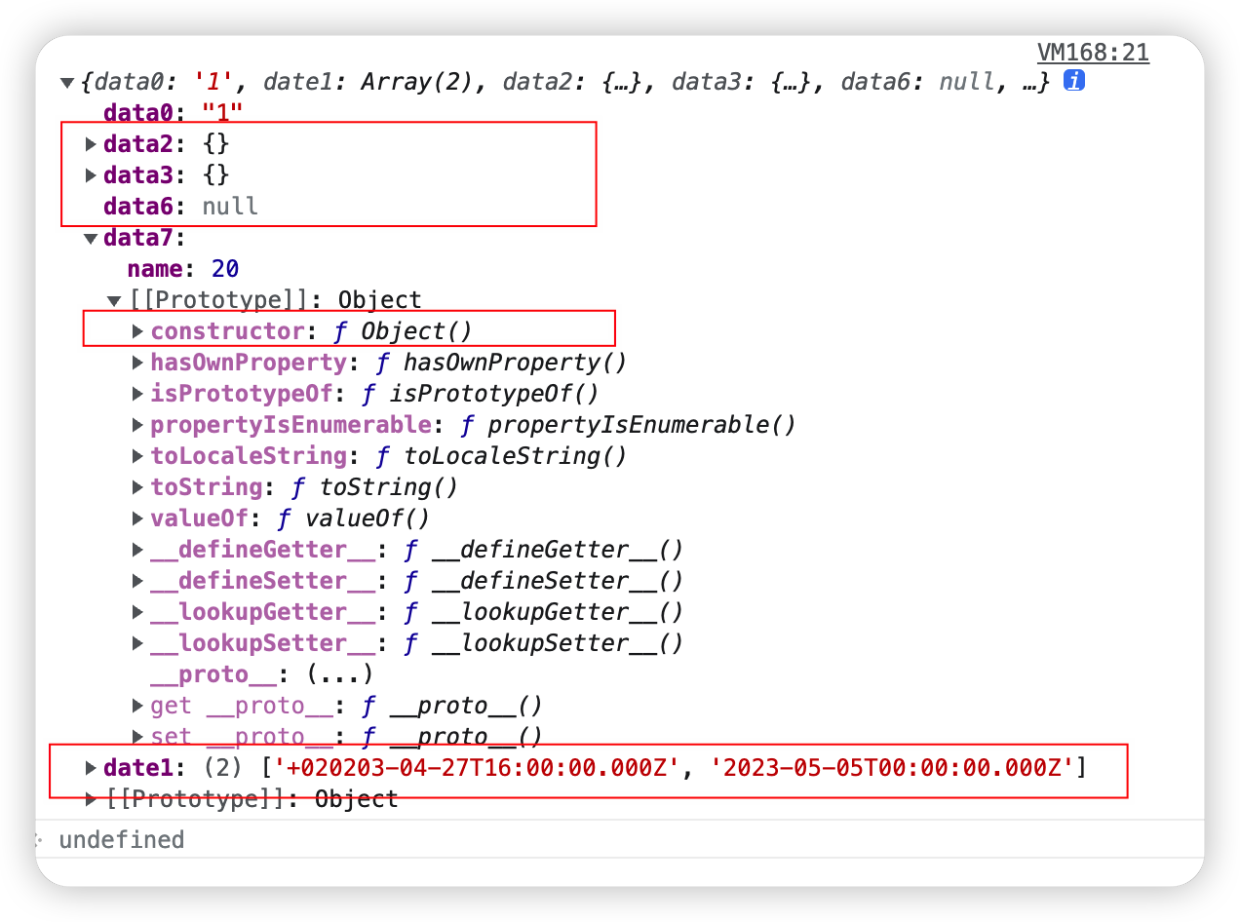
图片来源:原始图片。原文图片地址在抓取时被错误拼接为代理地址,现已恢复为可访问的简书图片地址。

九、总结
JSON.parse(JSON.stringify(value))是 JSON 序列化再解析,不是通用深拷贝;- 函数、
undefined、Symbol、BigInt、循环引用和特殊数值都有明确边界; - Date 会变成字符串,RegExp/Map/Set/Error 通常丢失类型和内部状态;
- class 原型、方法、私有字段、属性描述符和 Symbol 属性不会自动保留;
- JSON 适合明确的跨语言数据协议,
structuredClone更适合支持范围内的结构化数据复制; - 复制前应先明确是否需要保留原型、身份关系、特殊对象、函数和资源所有权。