「ES6系列」解构赋值全解析(现代 JavaScript 版)
解构赋值最早随 ES2015(ES6)进入 JavaScript。它没有“拆开并复制整个对象”的特殊运行时魔法,而是按照解构模式从可迭代对象或对象属性中读取值,再绑定到变量。本文保留原文的对象、数组、默认值、嵌套和混合解构示例,并修复抓取导致的语法错误,补充函数参数、剩余属性、迭代器和常见边界。
一、为什么需要解构
假设有一份学生数据:
const student = {
  name: 'jsPool',
  age: 20,
  scores: {
    math: 95,
    chinese: 98,
    english: 93
  }
}

function showScore(student) {
  console.log(`学生名:${student.name}`)
  console.log(`数学成绩:${student.scores.math ?? 0}`)
  console.log(`语文成绩:${student.scores.chinese ?? 0}`)
  console.log(`英语成绩:${student.scores.english ?? 0}`)
}

showScore(student)
解构后,可以把需要的属性直接绑定到局部变量:
function showScore(student) {
  const {
    name,
    scores: {
      math = 0,
      chinese = 0,
      english = 0
    } = {}
  } = student

  console.log(`学生名:${name}`)
  console.log(`数学成绩:${math}`)
  console.log(`语文成绩:${chinese}`)
  console.log(`英语成绩:${english}`)
}

showScore(student)
这里的 scores: { math } 表示从 scores 属性继续解构,并不创建名为 scores 的局部变量。若需要同时保留整个对象,可以单独写出:
const { name, scores } = student
二、对象解构
2.1 基本形式
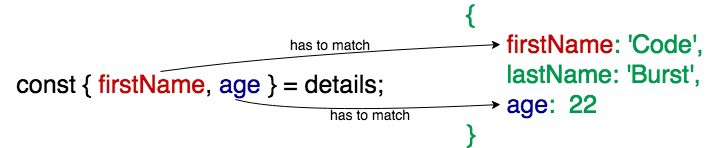
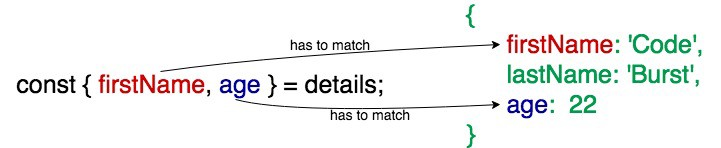
对象解构模式写在赋值号左边:
const details = {
  firstName: 'Code',
  lastName: 'Burst',
  age: 22
}

const { firstName, age } = details
console.log(firstName) // Code
console.log(age) // 22
对象解构根据属性名匹配,而不是根据属性出现的顺序:
const user = { name: 'Ada', age: 36 }
const { age, name } = user
console.log(name, age) // Ada 36
解构只是读取属性。对象本身不会因为解构而被深拷贝:
const source = { profile: { name: 'Ada' } }
const { profile } = source
profile.name = 'Grace'

console.log(source.profile.name) // Grace,共享同一个嵌套对象
2.2 非同名变量
使用 属性名: 变量名 可以把属性绑定到不同名称:
const person = {
  name: 'jsPool',
  country: 'China'
}

const { name: fullName, country: place } = person
console.log(fullName) // jsPool
console.log(place) // China
冒号左边是属性名,右边才是变量名。下面这种写法会把 name 当作变量名而不是别名:
const { name } = person
console.log(name) // jsPool
2.3 默认值
当属性值严格等于 undefined 时,默认值才会生效;属性值为 null 时不会触发默认值:
const person = {
  name: 'jsPool',
  country: 'China',
  sexual: undefined,
  nickname: null
}

const {
  age = 20,
  sexual: sex = 'male',
  nickname = 'unknown'
} = person

console.log(age) // 20
console.log(sex) // male
console.log(nickname) // null
默认值表达式在需要时才计算:
let calls = 0
function getDefault() {
  calls += 1
  return 'default'
}

const { present = getDefault() } = { present: 'value' }
const { missing = getDefault() } = {}
console.log(present, missing, calls) // value default 1
2.4 嵌套对象
对象模式可以继续嵌套:
const node = {
  name: 'foo',
  loc: {
    start: {
      line: 1,
      column: 1
    }
  }
}

const {
  loc: {
    start: { line }
  }
} = node

console.log(line) // 1
如果中间层可能不存在,必须给中间层提供默认对象,否则会在读取 undefined 的属性时抛出 TypeError:
function readLine(node = {}) {
  const {
    loc: {
      start: { line = 0 } = {}
    } = {}
  } = node

  return line
}

console.log(readLine()) // 0
console.log(readLine({ loc: { start: { line: 3 } } })) // 3
2.5 剩余属性(rest properties)
对象解构中的 ...rest 收集尚未被前面模式取走的自有可枚举属性:
const account = {
  id: 1,
  name: 'Ada',
  role: 'admin',
  active: true
}

const { id, ...profile } = account
console.log(id) // 1
console.log(profile) // { name: 'Ada', role: 'admin', active: true }
剩余属性必须位于模式最后,且它只复制属性值的引用,不会递归深拷贝:
const source = { nested: { ok: true }, value: 1 }
const { ...copy } = source
copy.nested.ok = false
console.log(source.nested.ok) // false
这与对象展开语法使用相似的属性枚举规则,但“解构”是读取并绑定,“展开”是创建/合并对象。
图片来源:原文配图。已下载为本地图片;原图来源站点和版权信息以其页面为准。
三、数组解构
3.1 按迭代顺序匹配
数组解构使用数组模式,按右侧值的迭代顺序匹配,而不是要求右侧一定是 Array:
const list = [221, 'Baker Street', 'London']
const [houseNo, street] = list
console.log(houseNo, street) // 221 Baker Street
字符串也是可迭代对象:
const [first, second, ...rest] = 'JavaScript'
console.log(first, second, rest.join('')) // J a vaScript
普通对象默认不可迭代,下面的代码会抛出 TypeError:
// const [value] = { value: 1 } // TypeError: object is not iterable
3.2 跳过元素
逗号可以跳过不需要的元素:
const list = [221, 'Baker Street', 'London']
const [houseNo, , city] = list
console.log(houseNo, city) // 221 London
3.3 数组默认值
数组位置对应的值为 undefined 时使用默认值:
const list = [221, 'Baker Street']
const [houseNo, street, city = 'Beijing'] = list
console.log(houseNo, street, city) // 221 Baker Street Beijing

const [a = 1] = [undefined]
const [b = 1] = [null]
console.log(a, b) // 1 null
3.4 剩余元素
数组剩余元素必须是最后一个模式,并且总是得到一个新数组:
const colors = ['red', 'green', 'blue']
const [firstColor, ...otherColors] = colors

console.log(firstColor) // red
console.log(otherColors) // ['green', 'blue']
console.log(otherColors === colors) // false
3.5 嵌套数组和混合结构
const colors = ['red', ['green', 'yellow'], 'blue']
const [firstColor, [secondColor]] = colors
console.log(firstColor, secondColor) // red green

const data = {
  name: 'foo',
  range: [0, 3],
  loc: { start: { line: 1, column: 1 } }
}

const {
  loc: { start: { line } },
  range: [startIndex]
} = data

console.log(line, startIndex) // 1 0

图片来源:原文配图。已下载为本地图片;原图来源站点和版权信息以其页面为准。

四、变量声明、赋值和函数参数
4.1 声明时解构
const [x, y] = [1, 2]
let { width, height } = { width: 100, height: 60 }
同一个声明中的变量名不能重复声明:
// const { a, a } = { a: 1 } // SyntaxError
4.2 已有变量的解构赋值
如果解构赋值表达式以对象字面量开头,需要用括号包住它,否则 { 会被解析为代码块:
let x
let y
;({ x, y } = { x: 1, y: 2 })

console.log(x, y) // 1 2
数组赋值通常不需要括号:
let first
let second
;[first, second] = [3, 4]
开头的分号是为了防止前一行代码以 ( 或 [ 结尾时发生自动分号插入歧义。
4.3 函数参数解构
函数参数可以直接使用对象或数组模式,也可以同时提供默认参数对象:
function createLabel({ name, color = 'black' } = {}) {
  return `${name ?? 'unnamed'}:${color}`
}

console.log(createLabel({ name: 'warning', color: 'orange' })) // warning:orange
console.log(createLabel()) // unnamed:black
数组参数也可以解构:
function sum([a = 0, b = 0]) {
  return a + b
}

console.log(sum([2, 3])) // 5
默认参数 = {} 只能防止参数本身是 undefined;显式传入 null 仍会导致对象解构失败:
// createLabel(null) // TypeError
4.4 for...of 中的解构
const entries = [
  ['name', 'Ada'],
  ['language', 'JavaScript']
]

for (const [key, value] of entries) {
  console.log(`${key}: ${value}`)
}
Object.entries() 与解构结合后,适合遍历对象的键和值:
const scores = { math: 95, english: 93 }
for (const [subject, score] of Object.entries(scores)) {
  console.log(subject, score)
}
五、常见误区
5.1 解构不会为缺失对象层自动创建对象
const user = {}
// const { profile: { name } } = user // TypeError

const { profile: { name } = {} } = user
console.log(name) // undefined
5.2 默认值只处理 undefined
const { a = 10, b = 10, c = 10 } = {
  a: undefined,
  b: null,
  c: 0
}

console.log(a, b, c) // 10 null 0
如果业务希望把 null、空字符串或其他值也视为缺省,需要显式使用 ?? 或业务判断:
const input = { timeout: null }
const timeout = input.timeout ?? 3000
console.log(timeout) // 3000
5.3 解构模式不是 JSON 语法
解构是 JavaScript 语法,右侧可以是变量、函数返回值、可迭代对象或普通对象;它不要求数据来自 JSON,也不会自动校验数据结构。对外部输入解构前,应先做运行时校验。
5.4 变量名不能使用保留冲突或未声明的赋值方式
const { name: userName } = { name: 'Ada' }
console.log(userName)

// const { name: user-name } = {} // SyntaxError,变量名不能含连字符
5.5 解构与可选链不是一回事
如果只想安全读取一层属性,可选链更直接:
const user = {}
console.log(user.profile?.name) // undefined
如果要同时绑定多个字段,或设置默认值,解构更清晰:
const {
  profile: { name = 'unknown' } = {}
} = user
console.log(name) // unknown
六、总结
解构赋值的要点可以归纳为:
- 对象解构按属性名匹配,数组解构按迭代顺序匹配;
属性: 变量是改名,变量 = 默认值是默认值;- 默认值只在匹配结果为
undefined时生效; - 对象剩余属性和数组剩余元素必须放在最后;
- 嵌套解构要为可能缺失的中间层提供默认值;
- 已有对象变量进行解构赋值时,通常需要用括号包住对象模式;
- 解构只读取/绑定值,不会自动深拷贝对象;
- 右侧数组模式要求可迭代对象,函数参数解构要考虑
undefined和null边界。
参考资料: