带你了解 Vue Router 的两种路由模式
原文介绍 hash 和 history 两种模式,并通过浏览器 API 演示路径变化。本文保留原有示例,同时修正“history 每次切换都会请求后端”、
pushState会触发popstate等常见误解,并补充 Vue Router 3、4/5 和服务器部署的差异。
一、路由模式解决什么问题
前端路由的目标是:在单页应用中改变当前 URL,并根据 URL 渲染不同页面,而不必每次点击都重新下载完整 HTML。
浏览器 URL 可以粗略分为:
协议://主机/路径?查询参数#片段
其中 hash 片段由 # 开始,不会作为 HTTP 请求路径发送给服务器;pathname、query 等则会参与正常的文档请求。客户端路由器可以监听 URL 变化,再渲染对应组件。
Vue Router 常见的浏览器模式是:
- Hash 模式:URL 中包含
#,使用hashchange; - HTML5 History 模式:URL 没有
#,使用history.pushState、replaceState和popstate。
Vue Router 4/5 还提供 memory history,主要给 SSR、Node 或非浏览器环境使用。
二、Hash 模式
1. 地址和服务器请求
Hash URL 例如:
https://example.com/#/vue
浏览器请求文档时,服务器通常只看到 /,不会收到 #/vue。因此服务器不需要为每个前端路由配置 HTML fallback,刷新时一般也不会因为前端路径不存在而返回 404。
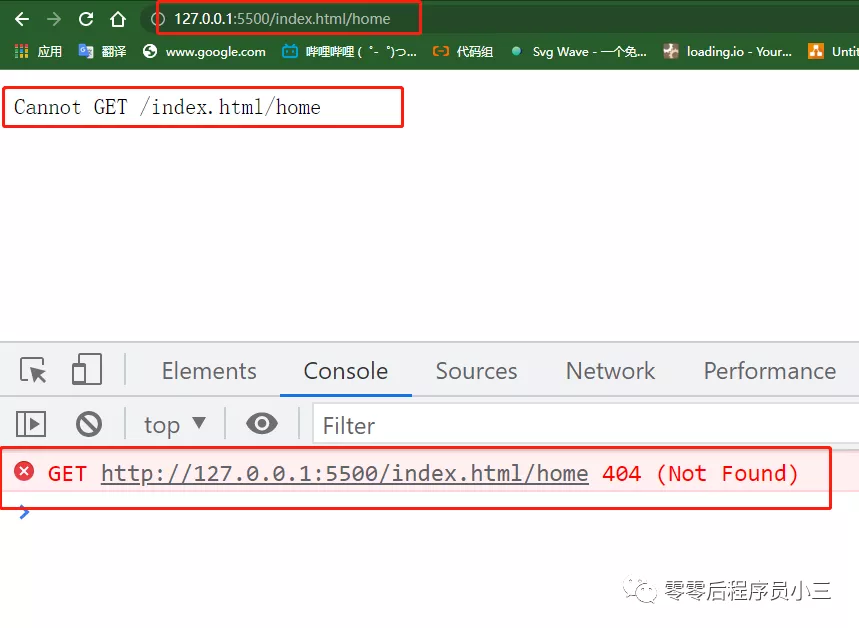
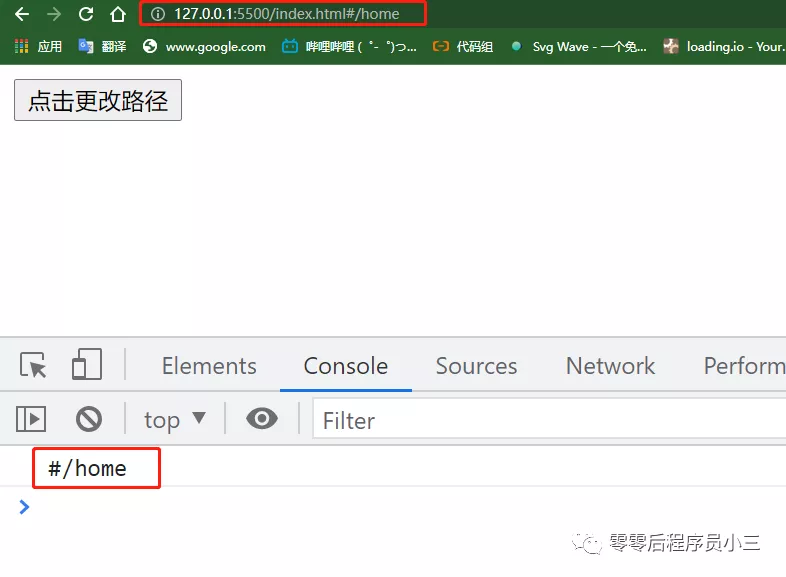
Hash 片段变化不会触发整页导航,但浏览器会记录 hash 历史,所以前进和后退仍然可以触发路由变化。缺点是 URL 中有 #,对 SEO、分享链接观感和某些服务端分析场景不如正常路径;现代浏览器兼容性通常不是主要问题。
2. 原生 hash 示例
<button id="hash-button">切换到 /home</button>

<script>
  const button = document.querySelector('#hash-button')

  window.addEventListener('hashchange', event => {
    console.log('old URL:', event.oldURL)
    console.log('new URL:', event.newURL)
    console.log('current hash:', window.location.hash)
    render(window.location.hash.slice(1) || '/')
  })

  button.addEventListener('click', () => {
    window.location.hash = '/home'
    // 也可以使用 location.href = '#/home'
  })

  function render(path) {
    console.log('根据 hash 渲染页面:', path)
  }
</script>
hashchange 会在 hash 改变后触发。改变其他 pathname 或 query 不会触发这个事件。真实 Vue Router 还需要负责路由匹配、参数、query、导航守卫、异步组件和 RouterView。
3. Vue Router 中的配置
Vue Router 3:
const router = new VueRouter({
  mode: 'hash',
  routes,
})
Vue Router 4/5:
import { createRouter, createWebHashHistory } from 'vue-router'

const router = createRouter({
  history: createWebHashHistory(),
  routes,
})
Vue Router 3 的 mode 和 Router 4/5 的 history 是不同 API,不能混写。
三、HTML5 History 模式
1. pushState 不等于向服务器请求
History API 可以在当前页面中修改地址并建立历史记录:
history.pushState({ page: 'home' }, '', '/home')
history.replaceState({ page: 'home' }, '', '/home')
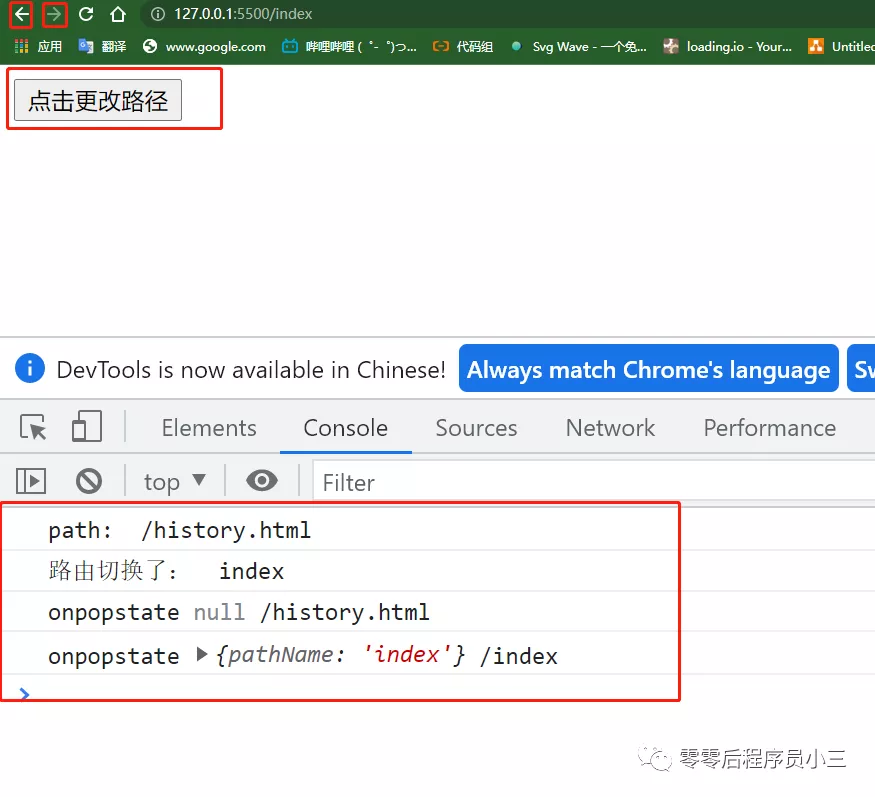
这两个方法本身不会发送 HTTP 请求,也不会自动触发 popstate。应用需要在调用后主动更新视图;当用户点击浏览器前进/后退时,浏览器才会触发 popstate。
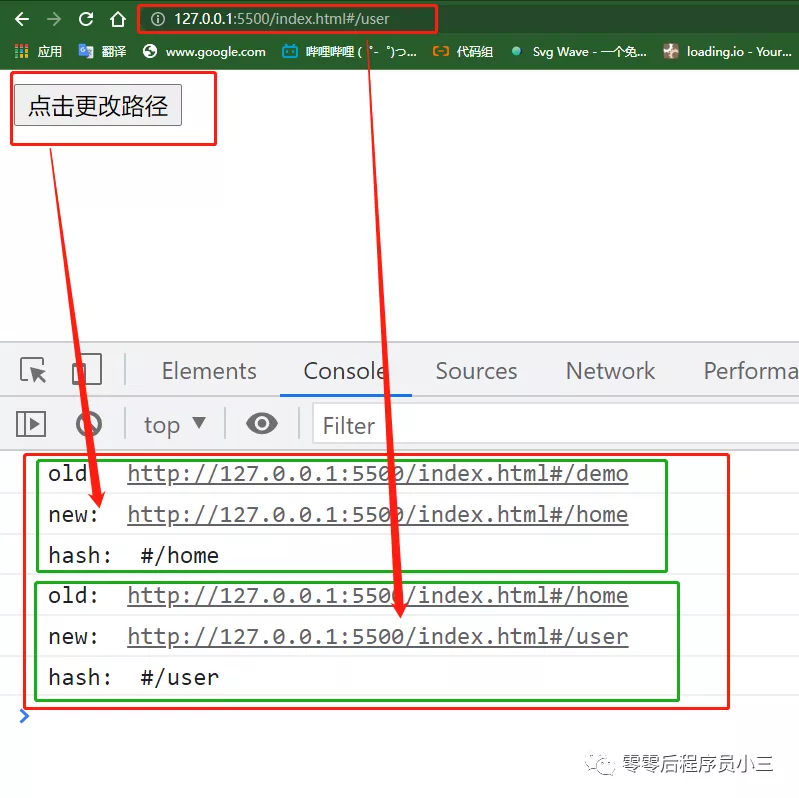
只有以下情况通常会请求服务器:
- 用户直接打开一个深层 History URL;
- 用户刷新页面;
- 页面从外部导航进入该 URL;
- 应用主动进行了整页导航。
2. 原生 history 示例
<button id="history-button">切换到 /home</button>

<script>
  const button = document.querySelector('#history-button')

  function render(path) {
    console.log('根据 pathname 渲染页面:', path)
  }

  button.addEventListener('click', () => {
    const path = '/home'
    history.pushState({ path }, '', path)
    render(path) // pushState 不会自动触发 popstate
  })

  window.addEventListener('popstate', event => {
    console.log('popstate state:', event.state)
    render(window.location.pathname)
  })

  window.addEventListener('DOMContentLoaded', () => {
    render(window.location.pathname)
  })
</script>
初始页面的 event.state 可能是 null,因为浏览器不会自动为每一个历史条目提供应用自定义的 state。路由器应以当前 URL 为主要匹配依据,不能假设 state 一定存在。
3. Vue Router 中的配置
Vue Router 4/5 推荐使用 createWebHistory():
import { createRouter, createWebHistory } from 'vue-router'

const router = createRouter({
  history: createWebHistory(import.meta.env.BASE_URL),
  routes: [
    { path: '/', component: () => import('./views/HomeView.vue') },
    { path: '/home', component: () => import('./views/HomeView.vue') },
  ],
})
Vue Router 3 对应写法:
const router = new VueRouter({
  mode: 'history',
  routes,
})
History 模式 URL 更自然,也更适合服务端参与渲染和 SEO,但部署服务器必须把未知的前端路径回退到应用入口 index.html,同时让真实静态资源正常返回。
例如 nginx:
location / {
  try_files $uri $uri/ /index.html;
}
如果应用部署在子目录,需要为 router 配置正确的 base,并同步调整服务器 fallback。Nuxt 4 由框架处理文件路由、服务端渲染和部署适配时,不应直接照搬纯 Vite SPA 的 nginx 配置。
四、Hash 和 History 的对比
| 维度 | Hash | HTML5 History |
|---|---|---|
| URL | 包含 # | 正常 pathname |
| 主要 API | hashchange | pushState、replaceState、popstate |
| 刷新深层路径 | 通常不需要额外 fallback | 需要服务器 fallback |
| 服务端收到 hash | 不会收到 | 会收到 pathname/query |
| SEO/链接观感 | 通常较弱 | 通常更自然 |
| 部署复杂度 | 较低 | 需要正确配置服务器 |
| Vue Router 4/5 | createWebHashHistory() | createWebHistory() |
没有绝对更好的模式:
- 静态托管、无法修改服务器配置或旧系统迁移时,Hash 更省事;
- 需要干净 URL、服务端渲染或更好的搜索引擎路径时,History 更合适;
- SSR/Node 环境可以考虑
createMemoryHistory(),但它不会自动操作浏览器 URL,也不会自动执行初始导航,应用需要手动 push 初始地址。
五、路由模式之外还要注意什么
1. 路由导航和页面渲染
路由模式只负责 URL 历史,真正的 Vue Router 还提供:
<RouterLink to="/home">首页</RouterLink>
<RouterView />
以及动态参数、query、嵌套路由、异步组件、滚动行为和导航守卫。
2. 导航守卫版本差异
Vue Router 3 常见:
router.beforeEach((to, from, next) => {
  if (to.meta.requiresAuth && !isLoggedIn()) {
    next({ name: 'login' })
    return
  }
  next()
})
Vue Router 4/5 推荐直接返回结果:
router.beforeEach(to => {
  if (to.meta.requiresAuth && !isLoggedIn()) {
    return { name: 'login', query: { redirect: to.fullPath } }
  }
  return true
})
3. 404 页面
服务器 fallback 只保证把请求交给前端应用,不代表路由一定存在。仍然需要在客户端配置 catch-all 路由:
{
  path: '/:pathMatch(.*)*',
  component: () => import('./views/NotFoundView.vue'),
}
如果服务端拥有自己的 SSR 路由匹配器,则还可以在服务端对真正不存在的 URL 返回 404。
六、总结
- Hash 模式利用 URL 片段和
hashchange,片段不发送给服务器,部署简单; - History 模式利用 History API,
pushState/replaceState修改地址但不会自动触发popstate; - History 模式点击链接通常不会请求服务器,但刷新或直接访问深层 URL 时需要服务器 fallback;
- Vue Router 3 使用
mode,Vue Router 4/5 使用createWebHistory/createWebHashHistory; - 路由模式不是安全机制,权限仍需由服务端校验;
- 选择模式时综合考虑部署能力、SEO、SSR、URL 体验和项目历史,而不是只看有没有
#。
参考资料
- Vue Router 4/5:不同 History 模式
- Vue Router:创建路由
- Vue Router:导航守卫
- MDN:History API
- MDN:pushState
- MDN:popstate
- MDN:hashchange
原文作者:东方小月。原文关于 hash/history 地址差异、浏览器 API、前进后退和服务器配置的主线予以保留;重复段落、损坏的代码围栏、编号噪声以及对 pushState、popstate 和服务端请求的错误描述已清理或修正。