让虚拟 DOM 和 DOM Diff 不再成为你的绊脚石
原文通过一个小型 React 脚手架项目,手写
Element、createElement、render、diff和patch,帮助读者理解虚拟 DOM 的完整链路。本文保留这条实战路线,修复原代码中空节点、文本节点、子节点数量变化、属性删除、全局索引和 patch 遍历顺序等问题,并说明它与 Vue 2/3 renderer 的关系。
一、先明确:这是学习版 renderer
虚拟 DOM 的基本链路是:
JavaScript 对象描述 UI
  ↓
render/mount 创建真实节点
  ↓
状态变化,生成新的描述树
  ↓
diff 比较新旧树
  ↓
patch/renderer 提交必要的 DOM 操作
下面的代码是一个教学版、无组件、无 key 移动优化的 renderer。它不能替代 Vue/React,因为真实框架还要处理:
- 组件实例和生命周期;
- 响应式更新与 scheduler;
- 事件更新、DOM property 和布尔属性;
- Fragment、Portal/Teleport、Suspense、指令和 transition;
- keyed children 移动、异步组件和 SSR hydration;
- SVG、表单状态、错误边界和卸载清理。
二、项目准备:保留旧写法,也给出当前选择
原文使用 create-react-app:
npx create-react-app dom-diff
cd dom-diff
npm start
这是当时常见的学习方式。对于现在的新项目,更推荐使用 Vite:
pnpm create vite dom-diff --template vanilla
cd dom-diff
pnpm install
pnpm dev
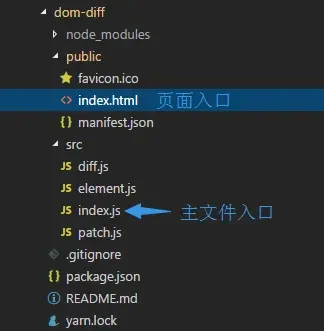
无论使用哪个脚手架,下面的 element.js、diff.js 和 patch.js 都是普通 JavaScript 模块,不依赖 React 或 Vue。这里不执行构建,仅整理源码原理。
三、创建虚拟 DOM
element.js
export class Element {
  constructor(type, props = {}, children = []) {
    this.type = type
    this.props = props || {}
    this.children = children
  }
}

export function createElement(type, props = {}, children = []) {
  return new Element(type, props, children)
}

export function isElement(node) {
  return node instanceof Element
}
index.js
import { createElement } from './element.js'

const virtualDom = createElement('ul', { class: 'list' }, [
  createElement('li', { class: 'item' }, ['周杰伦']),
  createElement('li', { class: 'item' }, ['林俊杰']),
  createElement('li', { class: 'item' }, ['王力宏']),
])

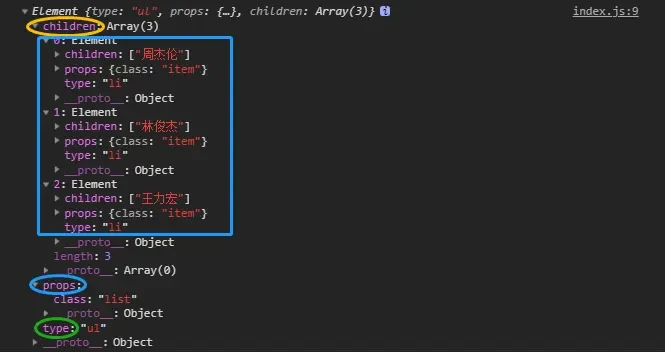
console.log(virtualDom)
type 表示标签,props 表示属性,children 表示子节点。真实框架的 vnode 还会记录 key、组件类型、事件、指令和内部优化标记。
四、把虚拟 DOM 渲染成真实 DOM
// element.js
export function render(vnode) {
  if (typeof vnode === 'string' || typeof vnode === 'number') {
    return document.createTextNode(String(vnode))
  }

  if (!isElement(vnode)) {
    throw new TypeError('未知的 vnode 类型')
  }

  const el = document.createElement(vnode.type)

  for (const [key, value] of Object.entries(vnode.props)) {
    setAttr(el, key, value)
  }

  for (const child of vnode.children) {
    el.appendChild(render(child))
  }

  vnode.el = el
  return el
}

export function setAttr(node, key, value) {
  if (value == null || value === false) {
    node.removeAttribute(key === 'className' ? 'class' : key)
    return
  }

  if (key === 'className' || key === 'class') {
    node.setAttribute('class', value)
    return
  }

  if (key === 'value' && ('value' in node)) {
    node.value = value
    return
  }

  if (key === 'style' && typeof value === 'object') {
    Object.assign(node.style, value)
    return
  }

  if (key.startsWith('on') && typeof value === 'function') {
    node.addEventListener(key.slice(2).toLowerCase(), value)
    return
  }

  node.setAttribute(key, String(value))
}

export function renderDom(el, target) {
  target.appendChild(el)
}
原文的 setAttr 只把属性转换成字符串,遇到 value、style、事件和 false 时会产生错误。教学代码至少要区分这些常见类型;生产 renderer 还要负责移除旧事件监听器,不能每次更新都无条件 addEventListener。
调用:
import { createElement, render, renderDom } from './element.js'

const virtualDom = createElement('ul', { class: 'list' }, [
  createElement('li', { class: 'item' }, ['周杰伦']),
  createElement('li', { class: 'item' }, ['林俊杰']),
  createElement('li', { class: 'item' }, ['王力宏']),
])

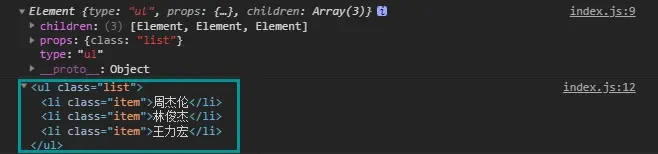
const el = render(virtualDom)
renderDom(el, document.querySelector('#root'))
五、Diff:比较两棵描述树
1. 补丁类型
export const PATCH = {
  TEXT: 'TEXT',
  PROPS: 'PROPS',
  REPLACE: 'REPLACE',
  REMOVE: 'REMOVE',
  INSERT: 'INSERT',
}
2. 属性 Diff
属性删除不能用 if (!value) 判断,因为 0、false 和空字符串都是合法值。应根据 key 是否存在或值是否为 null/undefined 判断:
export function diffProps(oldProps = {}, newProps = {}) {
  const patches = {}
  const keys = new Set([
    ...Object.keys(oldProps),
    ...Object.keys(newProps),
  ])

  for (const key of keys) {
    if (oldProps[key] !== newProps[key]) {
      patches[key] = newProps[key]
    }
  }

  return patches
}
3. 基于路径的 Diff
原文使用一个全局 num 记录树索引,存在两个问题:一次 diff 后没有重置会污染下一次比较;插入/删除节点后,真实 DOM 的索引也会变化。下面用路径表示节点位置,例如 [1, 0] 表示根节点的第二个子节点的第一个子节点:
import { PATCH } from './patch-types.js'
import { Element } from './element.js'
import { diffProps } from './diff-props.js'

export default function diff(oldNode, newNode, path = [], patches = []) {
  if (oldNode == null && newNode != null) {
    patches.push({ path, type: PATCH.INSERT, vnode: newNode })
    return patches
  }

  if (newNode == null) {
    patches.push({ path, type: PATCH.REMOVE })
    return patches
  }

  const oldText = ! (oldNode instanceof Element)
  const newText = ! (newNode instanceof Element)

  if (oldText || newText) {
    if (oldText !== newText) {
      patches.push({ path, type: PATCH.REPLACE, vnode: newNode })
    } else if (String(oldNode) !== String(newNode)) {
      patches.push({ path, type: PATCH.TEXT, text: String(newNode) })
    }
    return patches
  }

  if (oldNode.type !== newNode.type) {
    patches.push({ path, type: PATCH.REPLACE, vnode: newNode })
    return patches
  }

  const props = diffProps(oldNode.props, newNode.props)
  if (Object.keys(props).length > 0) {
    patches.push({ path, type: PATCH.PROPS, props })
  }

  const length = Math.max(
    oldNode.children.length,
    newNode.children.length,
  )

  for (let index = 0; index < length; index++) {
    diff(
      oldNode.children[index],
      newNode.children[index],
      [...path, index],
      patches,
    )
  }

  return patches
}
这是按位置的 unkeyed Diff:当子节点排序时,它会复用相同位置的节点,而不会自动识别业务身份。要支持移动,需要给 vnode 增加稳定 key,并实现 keyed children 算法。
原文中的 walk 还直接访问 oldNode.type,遇到文本节点或旧节点不存在时会报错;上面的代码先处理空节点和文本节点,再读取 type。
六、应用更新:一个直接递归的 patch
为了让示例足够清楚,下面不把补丁索引和实时 DOM 索引混在一起,而是使用旧 vnode、新 vnode 和 DOM 父容器递归更新。它表达的就是“比较并提交”:
import { Element, render, setAttr } from './element.js'

export function patchNode(parent, oldNode, newNode, index = 0) {
  const currentEl = parent.childNodes[index]

  if (oldNode == null && newNode != null) {
    parent.insertBefore(render(newNode), parent.childNodes[index] || null)
    return
  }

  if (newNode == null) {
    if (currentEl) parent.removeChild(currentEl)
    return
  }

  const oldText = !(oldNode instanceof Element)
  const newText = !(newNode instanceof Element)

  if (oldText || newText) {
    if (String(oldNode) !== String(newNode) && currentEl) {
      parent.replaceChild(render(newNode), currentEl)
    }
    return
  }

  if (oldNode.type !== newNode.type) {
    parent.replaceChild(render(newNode), currentEl)
    return
  }

  updateProps(currentEl, oldNode.props, newNode.props)

  const length = Math.max(
    oldNode.children.length,
    newNode.children.length,
  )

  for (let i = 0; i < length; i++) {
    patchNode(
      currentEl,
      oldNode.children[i],
      newNode.children[i],
      i,
    )
  }
}

function updateProps(element, oldProps = {}, newProps = {}) {
  const keys = new Set([
    ...Object.keys(oldProps),
    ...Object.keys(newProps),
  ])

  for (const key of keys) {
    if (oldProps[key] !== newProps[key]) {
      // 真实实现应先移除旧事件监听器,再绑定新监听器。
      setAttr(element, key, newProps[key])
    }
  }
}
这个 patch 支持文本、属性、替换、插入和删除,但不支持 keyed 移动、事件解绑、组件和 Fragment。它还采用按位置复用的策略,所以只适合作为入门实现。
七、完整调用示例
import { createElement, render, renderDom } from './element.js'
import diff from './diff.js'
import { patchNode } from './patch.js'

const oldTree = createElement('ul', { class: 'list' }, [
  createElement('li', { class: 'item' }, ['周杰伦']),
  createElement('li', { class: 'item' }, ['林俊杰']),
  createElement('li', { class: 'item' }, ['王力宏']),
])

const newTree = createElement('ul', { class: 'list-group' }, [
  createElement('li', { class: 'item active' }, ['七里香']),
  createElement('li', { class: 'item' }, ['一千年以后']),
  createElement('li', { class: 'item' }, ['需要人陪']),
])

const root = document.querySelector('#root')
const el = render(oldTree)
renderDom(el, root)

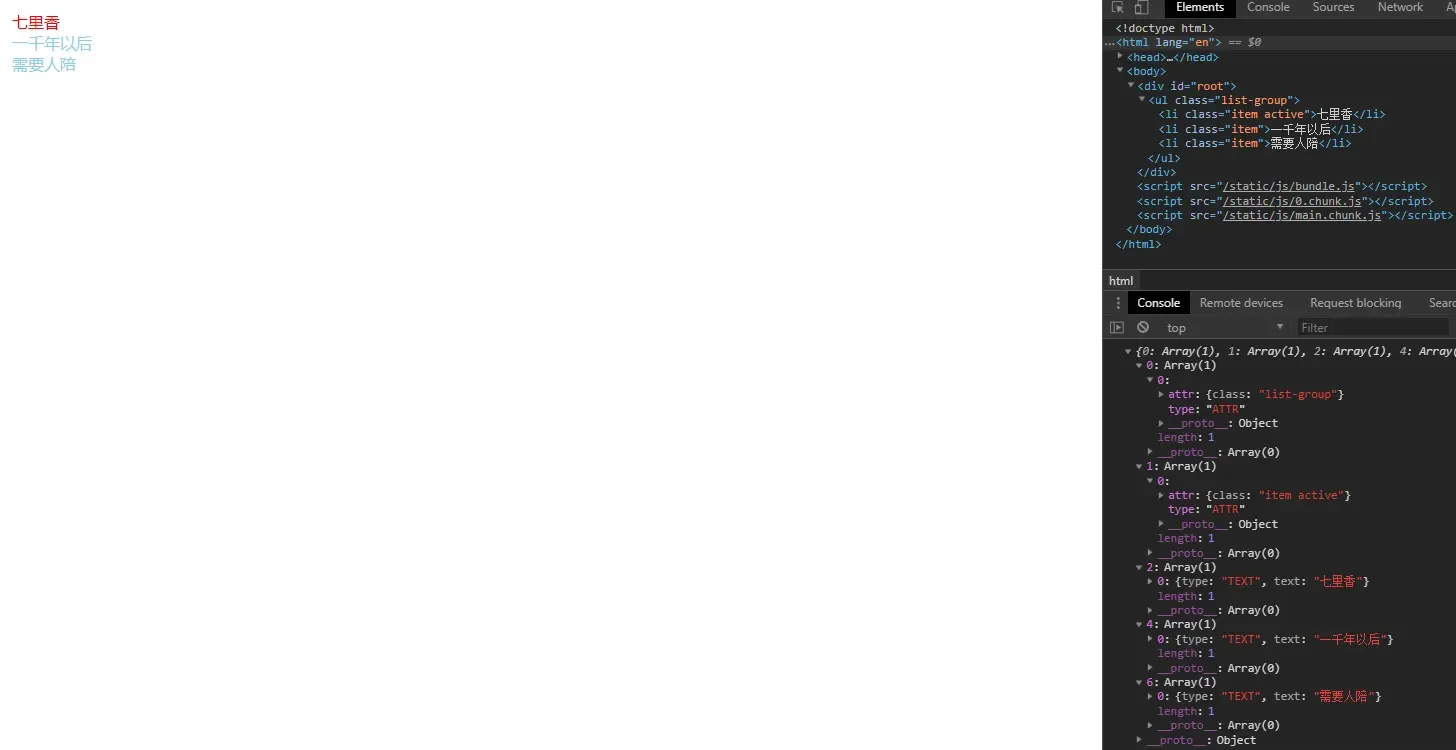
console.log(diff(oldTree, newTree))
patchNode(root, oldTree, newTree, 0)
如果把状态变化封装进组件,可以在 setState 中重新生成 vnode:
class Component {
  constructor() {
    this.state = { text: '初始化' }
    this.vnode = null
    this.root = null
  }

  render() {
    return createElement('div', {}, [this.state.text])
  }

  mount(root) {
    this.root = root
    this.vnode = this.render()
    renderDom(render(this.vnode), root)
  }

  setState(partial) {
    const nextState = { ...this.state, ...partial }
    const nextVNode = this.renderWith(nextState)
    patchNode(this.root, this.vnode, nextVNode, 0)
    this.state = nextState
    this.vnode = nextVNode
  }

  renderWith(state) {
    return createElement('div', {}, [state.text])
  }
}
这里的 Component 只是帮助理解状态到 vnode 的关系,缺少响应式、生命周期、事件和组件树管理。Vue 的组件更新由响应式 effect 触发,不需要业务代码手动调用这个类。
八、这段手写代码和 Vue 的关系
相似之处
- 都用 JavaScript 数据结构描述 UI;
- 都需要区分首次 mount 和后续 update;
- 都会比较节点类型、属性、文本和子节点;
- 都需要处理插入、删除、替换和属性更新;
- keyed children 都依赖稳定 key 来识别节点身份。
Vue 2 的额外工作
Vue 2 的 patch 使用 VNode、sameVnode、patchVnode 和 updateChildren,还要调用 attrs、class、style、event、directive、transition 等模块钩子;列表使用双端比较和 key 映射。
Vue 3 的额外工作
Vue 3 renderer 还结合:
shapeFlag区分元素、组件、Teleport、Suspense 等;- patch flags 和 block tree 跳过静态内容;
patchKeyedChildren使用 key 映射和移动优化;- 组件渲染 effect 与 scheduler 批量调度;
- hydration、Fragment、指令、Transition 和异步组件。
所以“手写 Diff 能运行”不等于“已经实现了 Vue 的 Diff”。
九、常见错误总结
- 把 JSX 当成虚拟 DOM 本身;
- 把 vnode 固定写成
tag/props/children,忽略 Vue 2/3/React 的差异; - 文本节点、空节点也直接读取
.type; - 只遍历旧 children,漏掉新列表多出来的节点;
- 用 truthy 判断属性是否应该删除,误删
false/0; - 用全局索引记录 Diff,却不在每次调用前重置;
- patch 时先深度遍历并修改 DOM,导致后续 childNodes 索引错位;
- 认为按位置比较就能正确处理所有列表,忽略 key 和组件状态。
总结
- 手写 VDOM 的最小链路是
createElement → render → diff → patch; - vnode 是描述对象,真实 DOM 是 renderer 的提交结果;
- Diff 需要先处理空节点和文本节点,再比较类型、属性和子节点;
- 属性删除不能用简单的 truthy 判断;
- 按位置 Diff 适合教学,复杂列表需要稳定 key 和移动算法;
- Vue 2/3 的 renderer 还包含组件、响应式、调度、Fragment、异步和 SSR 等大量能力;
- VDOM 没有自动性能保证,算法和真实 DOM 提交都要结合场景衡量。
参考资料
原文作者:chenhongdong。原文关于 Element、createElement、render、Diff、patch 和完整调用流程的内容予以保留;create-react-app 的历史背景已补充当前 Vite 选择,原代码中的空节点、子节点数量、属性删除、全局索引和 patch 遍历问题已修正或明确为教学限制。